Getting Instagram up and running on Huawei smartphones is simpler than ever in 2026. Although Huawei devices operate without pre-installed Google Mobile Services (GMS), millions of users worldwide enjoy uninterrupted access to their favorite social apps through a streamlined solution. Enabling huawei instagram functionality takes only a few minutes when you combine Huawei’s official AppGallery with the GBox utility. This 2026 walkthrough covers every step needed to install, configure, and enjoy Instagram on your Huawei handset—allowing you to browse your main feed, share daily Stories, edit creative Reels, discover trending accounts on Explore, and chat via Direct Messages without missing a beat.
Why GBox Is the Trusted Choice for Instagram on Huawei
Verified Security and Smooth Daily Performance
Huawei smartphone owners can feel confident using GBox, a widely trusted compatibility environment that has passed comprehensive security checks before appearing in Huawei’s ecosystem. Whenever Instagram calls on underlying Google services for features like location tagging or instant push alerts, GBox bridges the gap safely in the background. Beyond making huawei instagram effortless to set up, GBox ensures responsive performance across the board—signing into your profile, loading high-resolution photo carousels, applying interactive Story stickers, and streaming Reels all work smoothly. The tight pairing of AppGallery and GBox reflects Huawei’s dedication to delivering a secure, hassle-free app experience in 2026.
Bridging the App Gap Without Complex Tweaks
With GBox installed, running leading global apps on a Huawei phone requires zero technical expertise. Once GBox is configured during your first app download, subsequent social and lifestyle apps run automatically without needing separate plugins or manual APK sideloading. GBox serves as an invisible compatibility layer that prevents crashes and eliminates Google service errors, giving Huawei users full access to today’s most popular mobile platforms.
Step-by-Step Guide to Setting Up Instagram on Huawei
Finding Instagram Inside Huawei AppGallery
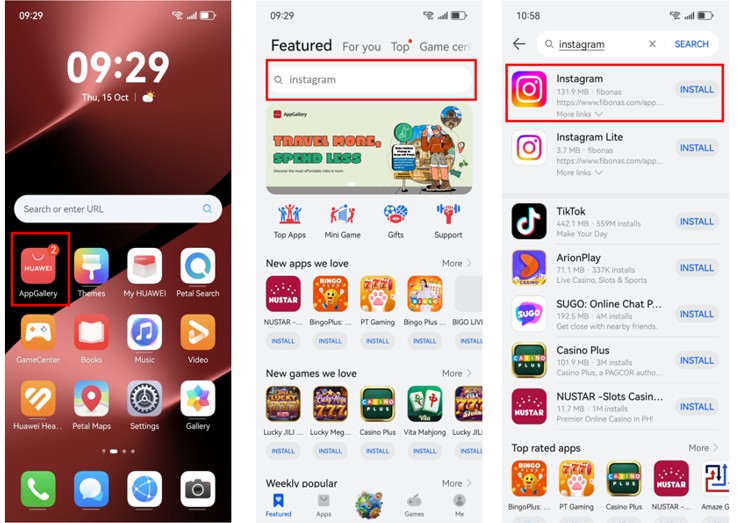
Start by launching AppGallery, the official application marketplace pre-loaded on every Huawei phone and tablet. Tap the AppGallery icon on your home screen, select the search bar at the top, and enter “Instagram.” Choose the official app listing from the results to view the download page. In several regions and on newer 2026 Huawei models, an install button will be ready right away. If the app requires a virtual environment in your region, AppGallery will automatically prompt you to add GBox so that huawei instagram operates with full compatibility.
Completing the One-Time GBox Setup
When prompted during the Instagram installation flow, tap “Install” to download GBox onto your device. Once the quick installation finishes, GBox runs silently in the background to support Instagram and any other GMS-dependent apps you choose to add later. Installing both tools directly through AppGallery keeps your device protected while saving you the trouble of hunting for third-party installers.
Signing In and Exploring Instagram Features
After the installation completes, both Instagram and GBox shortcuts will appear on your home screen. Tap the Instagram icon to open the app, enter your login details, and jump straight into your feed. Every feature performs just as expected: double-tapping photos, posting 60-second Stories, mixing audio for Reels, shopping from creator storefronts, and video calling in Direct Messages. Powered by GBox, huawei instagram feels indistinguishable from running the app on any other flagship phone in 2026.
See also: How Do Automobile Accident Lawyers Help You Win a Claim Fast?
Pro Tips for the Best Instagram Experience on Huawei
Once your account is active, a few quick tweaks will keep Instagram running at peak performance on your Huawei phone. First, allow AppGallery to keep GBox updated automatically so you always have the latest 2026 stability improvements. Second, if you notice delayed Direct Message alerts, open your system battery settings and permit GBox to run unrestricted in the background. Finally, to showcase the full power of your Huawei camera system, turn on “Upload at highest quality” inside Instagram’s Media Quality settings. Though optional, these simple habits guarantee that huawei instagram stays fast, reliable, and crystal clear over the long run.
